A Deep Dive into the Rally Company Scenario with Business Central
Autonomous agents are often discussed at a high level: orchestration, reasoning, memory, and autonomy. But what do they actually do in a real business context?
I had session in Experts Live Denmark 2026 and in one session of a MVP colleague Rob Kuijpers answered that question by moving beyond theory and showing working agents connected to Microsoft Dynamics 365 Business Central, embedded in a realistic business story. The result was a clear, end-to-end view of how different agents can support employees throughout the lifecycle of a product—from launch to service—without replacing human decision-making.
This article takes a deeper look at the agents demonstrated in the session, their roles, and the features that make them effective.
From Copilot to autonomous agents: setting the foundation
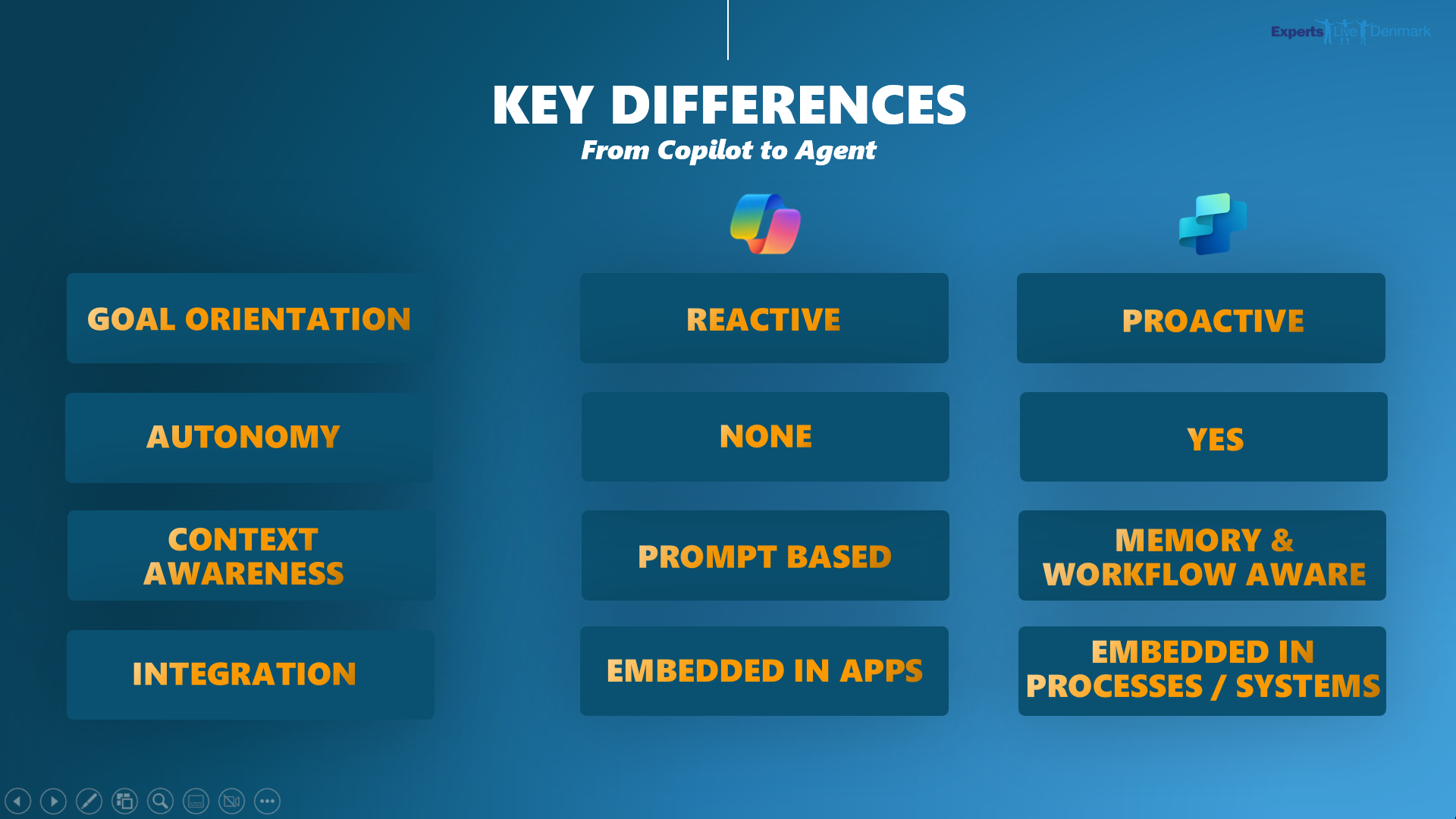
Rob began by clearly positioning the difference between Copilot and autonomous agents.
Copilot is reactive. It lives inside applications such as Outlook, Teams, CRM, and Business Central, and it boosts productivity when a user actively interacts with it. If no prompt is given, nothing happens.
Autonomous agents, on the other hand, are:
- Event-driven instead of prompt-driven
- Proactive, reacting to emails, forms, system changes, or time-based triggers
- Role-specific, just like employees in a real organization
Rather than being “a smarter Copilot,” agents act as digital colleagues working beside you, continuously monitoring their domain and stepping in when needed.
The rally company: a realistic agent playground
To make the concept tangible, Rob introduced a fictional rally auto‑parts company preparing to launch an innovative new shock absorber. This rally company served as the foundation for demonstrating multiple agents, each supporting a different part of the business.
The key principle was simple:
Agents should be designed for roles, not for everything.
Just as no human employee handles sales, service, finance, and development alone, agents are created with clear responsibilities and boundaries.
Agent 1: The customer inquiry agent
One of the first agents shown focused on customer interaction.
Role
This agent supports employees by handling incoming customer questions, especially during the product launch phase.
Key features demonstrated
- Reacts to incoming communication rather than waiting for a prompt
- Understands natural language questions from customers
- Uses Business Central data as its source of truth
- Prepares structured responses for human review or follow‑up
Instead of replacing customer service staff, the agent removes the repetitive work: gathering product information, checking availability, and summarizing relevant details. The human employee stays in control of final communication.
Agent 2: The product launch support agent
Launching a new product is not a single task—it’s a chain of activities across multiple systems.
Role
This agent supports the product launch process, ensuring that information flows consistently across the organization.
Key features demonstrated
- Monitors product-related changes in Business Central
- Supports employees with contextual information during launch activities
- Helps align sales, service, and operational data
Rather than manually checking multiple systems, employees can rely on the agent to surface relevant information exactly when it’s needed. This illustrates a key strength of autonomous agents: timing.
Agent 3: The service and complaint handling agent
Another important part of the rally story focused on after-sales service.
Role
This agent supports the handling of complaints and service requests, helping employees react faster and more consistently.
Key features demonstrated
- Listens for service-related events
- Connects customer issues with existing Business Central records
- Provides structured context for service employees
- Helps ensure nothing “falls through the cracks”
The agent does not decide outcomes. Instead, it ensures that service employees have the right information at the right moment, reducing response time and improving customer experience.
Agent 4: The employee productivity agent
Not all agents are customer-facing. Some are built purely to help internal employees.
Role
This agent works alongside employees inside Business Central and related tools.
Key features demonstrated
- Summarizes complex Business Central records
- Answers questions about customer or product data
- Reduces time spent navigating screens and tables
- Acts as a context-aware assistant, not a generic chatbot
This bridges the gap between classic Copilot usage and full autonomy. The agent is proactive in surfacing insights but still operates within the employee’s workflow.
Agent 5: The maker agent – building apps with AI
One of the most compelling moments of the session was when Rob built a new Power App live on stage, assisted by AI.
Role
This agent supports makers and developers by accelerating application creation.
Key features demonstrated
- Translates natural language intent into app structures
- Helps create functional Power Apps in real time
- Lowers the barrier for building business solutions
- Integrates seamlessly with existing data and processes
This showed that agents are not limited to operational tasks—they can actively support solution creation, enabling faster experimentation and innovation.
How these agents work together
An important, implicit lesson from the session was that agents do not work in isolation.
In the rally company scenario:
- Customer inquiry agents support sales and service
- Product launch agents support internal coordination
- Service agents close the loop after delivery
- Maker agents help evolve the solution landscape
All of them rely on:
- Business Central as the operational backbone
- Copilot capabilities for interaction and reasoning
- Power Platform for extensibility
Together, they form a collaborative system where humans and agents each focus on what they do best.
Why this matters
This session stood out because it transcended conceptual thinking. Instead of asking the audience to imagine autonomous agents, Rob showed what they already look like in practice—today.
The key takeaway was clear:
- Agents are not replacements
- Agents are accelerators
- Agents are most powerful when they are focused, contextual, and event-driven
For organizations working with Business Central and the Power Platform, this session provided a concrete blueprint for how autonomous agents can be introduced step by step—starting with real business value.
Final reflection
Autonomous agents are no longer an abstract future. As demonstrated in the rally company story, they are already capable of supporting product launches, customer service, employee productivity, and even app development—working quietly beside us, exactly when needed.
And that is what makes them truly autonomous.