
EPPC26 Session Recap — my own talk
European Power Platform Conference, Copenhagen | Thursday, July 2, 2026 | Track: Power Automate | Level 300
My own last session of EPPC26, last day, one of the last slots on the agenda — and yes, I opened with the joke, because with a last name like Spiik, “actions speak louder than words” was never going to not become a pun. Nineteen years of Microsoft project delivery, eight of them in Power Platform, three doing AI work, and — the part that ended up hijacking the second half of the talk — a few months now doing agent development with Claude Code. I build mostly in Copilot Studio and Power Platform, everything except Power BI, and I write books on the side about community and shared leadership, aimed deliberately low — I want a 20-year-old construction worker to be able to pick one up and get it.
The session was built around one fictional but fully working demo: a Copilot Studio job-application assistant I built a year ago (not in production, no real company behind it), and — the actual subject of this talk — the five Power Automate flows that run everything after someone applies. Here’s what I walked through, and what happened when I handed the same solution to an AI agent and asked it to find what I’d missed.
Build It in Pieces, Not All at Once
The first principle, and the one everything else hangs off: never build a flow end to end and then start testing. Add the trigger, test it. Add a scope, test it. Add the next action, test it. It sounds obvious, but the payoff is specific — when something breaks, you know exactly which piece broke, instead of staring at a fully wired flow wondering where in the chain it went wrong. Every pattern I showed after this one is really just this principle applied to a specific problem.
Logging: From “Good Enough” to Actually Professional
There’s a spectrum here, and I walked through most of it:
- The Dataverse flow run table — technically available, but old, unreliable, and already dropped from the CoE Starter Kit (which, in my opinion, is itself heading toward obsolete). Fine for a five-minute check, not for anything you’d build a process around.
- Manual in-flow logging to Teams — post an Adaptive Card into a channel whenever something happens. Customers who never open the maker portal can still see that the solution is alive, which matters more for trust than any dashboard.
- The real answer: Application Insights via Power Platform Admin Center’s Data Export — pipe runs, triggers, and actions straight into Azure Application Insights, then build alerting on top: an error fires a Teams message or an email to the right team, with a direct link to the failed flow run in the custom dimensions of the event. No hunting through the maker portal for the run that failed — you click the link in the alert.
The error-handling pattern underneath all of this is the classic try/catch shape, done with scopes: an action scope, a “run after: has failed” scope next to it. I don’t bother with a “finally” scope — I’ve never found a use for it in my solutions. The one rule I do insist on: terminate the flow with a Failed status when the error is unrecoverable. Skip that step and the run shows up as Succeeded in every log and report, which means nobody ever finds it again. Not every failure needs a hard stop, though — if a step is genuinely optional (updating an applicant’s notification email, say), log the error and let the flow continue. Matching the response to how serious the failure actually is, rather than reflexively terminating everything, is the actual skill.
Approvals Without a Spam Machine
The out-of-the-box Approvals connector works, and I demoed it, but it doesn’t scale as your only approval mechanism — use it everywhere and you build a spam machine, and it forces you to hard-code (or SharePoint-list, or Dataverse-table) a list of approvers somewhere.
My alternative: post an Adaptive Card into a Teams channel and let channel membership itself be the approver list. Whoever’s in that channel can approve; whoever doesn’t want to be part of it just hides the channel. No separate approvals table to maintain, and if it’s a private channel, you control exactly who’s in the loop without touching the flow at all.
Child Flows: Permission Scoping and Not Blocking the Parent
Two child-flow patterns that don’t get talked about enough:
Run-only-user for privilege scoping. If a child flow posts to a Teams channel the end user shouldn’t have access to, set the child flow’s run-only-user to a service account. The parent flow — and the user who triggered it — never needs Teams posting rights at all; the child flow borrows the service account’s permissions just for that step.
Respond early, then keep working. When a parent flow calls a child flow that does something slow — provisioning a SharePoint site and its libraries, in my case — the parent blocks until the child replies. So structure the child flow to respond back to the parent immediately, then continue its own slow work afterward. The parent moves on; the child finishes on its own time. I also set the child flow’s retry policy to None by default — the platform default retries automatically, and if that child flow is the one posting Adaptive Cards to Teams, a retry loop on a genuine failure just means duplicate cards piling up in the channel.
One more detail worth remembering: trigger conditions. Filtering a trigger on a specific column value (only fire when application status flips to “Under Review,” for instance) means the flow doesn’t even start for irrelevant changes — cheaper on your run quota and one less thing to debug. Boolean columns are the one gotcha here: sometimes they need “on update,” not just “on create,” to fire reliably, and I still can’t fully explain why.
The Governance Demo: A Self-Service Environment Request Portal
The second half of the session was a Power Platform governance solution I built for community self-service: request an environment, request a connector unblocked, add users — all through a Canvas app, all routed through Teams so nothing lands in a private inbox or an email nobody reads.
The one licensing decision worth flagging: the intake list lives in SharePoint, not Dataverse. With Dataverse, every requester in an organization of thousands of people needs a Power Apps premium license just to submit the form. SharePoint only needs the license everyone already has for Teams or Outlook. The SharePoint row triggers the parent flow, which posts an Adaptive Card approval into Teams, and on approval, Power Automate creates the environment, the Entra ID security groups, and messages the requester back with direct links — to the maker portal, to the new environment, to the security group they’ll need if they want to add more users later.
Two things I’d only learned by hitting them:
- A manual re-trigger escape hatch. I added a Yes/No field to the SharePoint list — flip it, and the flow re-runs without me going back into the maker portal to recreate the request from scratch.
- Creating a group and adding its members in one call. Try to create an Entra ID group with one action and add members with a second, and you can hit an “Access Denied” on the add-members step — even when the service account is the group’s owner — because of how the tenant’s group-creation process is configured. The fix: create the group and supply its members in a single Graph API JSON call instead of splitting it into two actions.
I’ll also admit this solution isn’t finished — it grew from one small request into a much bigger one the way customer projects tend to, and it needs a couple more child flows before I’d call it done. That’s a pattern in itself: if a Power Automate flow has quietly outgrown its original scope, tell the customer honestly that it’s time to refactor, rather than letting it calcify.
The AI Piece: A Prompt Action, No Full Copilot Studio Needed
One flow uses an AI Prompt action directly inside Power Automate — no Copilot Studio orchestration required — to compare an applicant’s CV against the job posting and draft feedback. It’s a small thing, but worth trying if you haven’t: it’s often enough on its own, and it’s a good answer the next time a customer asks “can you do something with AI here?”
Then I Asked Claude Code to Find What I’d Missed
This is the part of the talk that ran long, because the room’s reaction ran long with it. I’ve built an always-on Ubuntu VM in Azure — I hate machine setup, and Claude Code will happily install its own dependencies once it’s running, so I only had to get through that pain once. I connect from VS Code and just talk to it.
I pointed Claude Code at the demo’s agent files and Power Automate flows and asked it to find gaps in the use case. It found five — functionality the flows implied but didn’t actually implement. I asked it to build them. It asked for permission to install; I said yes; it used the Power Platform CLI (as an MCP server) to create the solution, publish it, and package it, entirely on its own.
What actually surprised me: it copied my conventions without being told to — the same scope-based error handling, the same child-flow pattern for posting to Teams, and it even found and correctly reused an AI Prompt I’d already built rather than creating a new one. I’ve built Power Automate flows by clicking through the designer for most of two decades, and it’s usually faster to build something myself than to describe it to a person who doesn’t already know the tool. With Claude, given a real specification, it just did the work — correctly enough that I was genuinely astonished. The one thing it still can’t do: generate a webhook trigger URL, which needs a manual click in the maker portal.
A few caveats I’m keeping front of mind, because the excitement shouldn’t erase them:
- This ran against my own demo tenant, not a customer’s production environment — and I’d think hard before giving an agent that scope. The service account behind this solution has System Administrator and Power Platform Administrator rights; an agent that goes “crazy” with that scope could delete an environment as easily as create one.
- If a customer won’t grant that kind of access, the safer pattern is still valuable: build and test in a demo/dev environment, then export and import the solution into the customer’s environment yourself.
- The cost is a Claude Pro subscription — about €20/month — layered on top of whatever Power Platform premium licensing you already have. It’s not a like-for-like cost comparison with “an hour of my time,” which raises a genuinely unresolved question I floated to the room: if this kind of work takes 20 minutes instead of half a day, and your business runs on hourly billing, do you bill three hours anyway? Move to value-based pricing? I don’t have the answer — it’s a business-model problem, not a technical one — but it’s coming for anyone who bills by the hour and adopts this seriously.
Takeaways
- Build iteratively, always — trigger, test, next action, test. Every other pattern in this talk is this idea applied somewhere specific.
- Terminate flows with a Failed status on unrecoverable errors — otherwise they vanish into “Succeeded” and nobody ever finds them again.
- Application Insights via Admin Center data export is the professional logging tier — direct links from alerts to the failed run beat searching the maker portal every time.
- Let Teams channel membership be your approval list instead of hard-coding approvers or spamming everyone with the out-of-the-box connector.
- Scope child-flow permissions with run-only-users, and respond early from slow child flows so the parent isn’t stuck waiting.
- SharePoint over Dataverse for wide-audience intake forms — it’s a licensing decision as much as a technical one.
- An agent given a real specification and your existing conventions can extend your own solution correctly — but only hand it the keys to an environment you’d be fine watching it break.
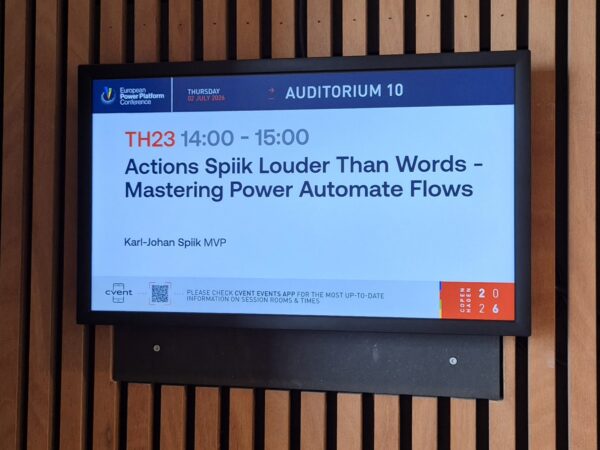
Session: “Actions Spiik Louder Than Words – Mastering Power Automate Flows” — EPPC26, Copenhagen, July 2, 2026
Presenter: Karl-Johan Spiik (CGI)