
The 12.45 slot at HELish Summit 2026 was about money rather than technology. Eetu Hämäläinen, who has spent ten years around Microsoft 365 with a technical background and now does this work through his own company, gave “How to Save Significant Costs with Microsoft Licensing Optimisation” in the Landing room. He started in English, asked the room how many were from Finland, and switched to Finnish when the answer was everyone. This is my recap; the observations are Eetu’s, the compression and the translation are mine.
His framing was blunt. Licensing is often the largest single line in an IT budget, and the default way to handle it is to ask for a quote, accept it, and lock in another year. That default is where the money goes.
Three reasons, which are the same reason
He asked the audience why licensing optimisation matters, then gave his own three main points. The first: nobody wants to pay more than they need, and there are enough different models that you can pay less without cutting services. The second: nobody wants to pay more than they need, because in his opinion Microsoft already has enough money. The third was the same sentence again. The joke carried the rest of the talk: this is not about buying less, it is about not paying for things nobody uses.
The arithmetic that makes it worth doing
The list price slide is the one to keep. These are his figures, from his slide, with his own caveat printed on it: prices are approximate and vary by agreement type, billing model and licensing provider.
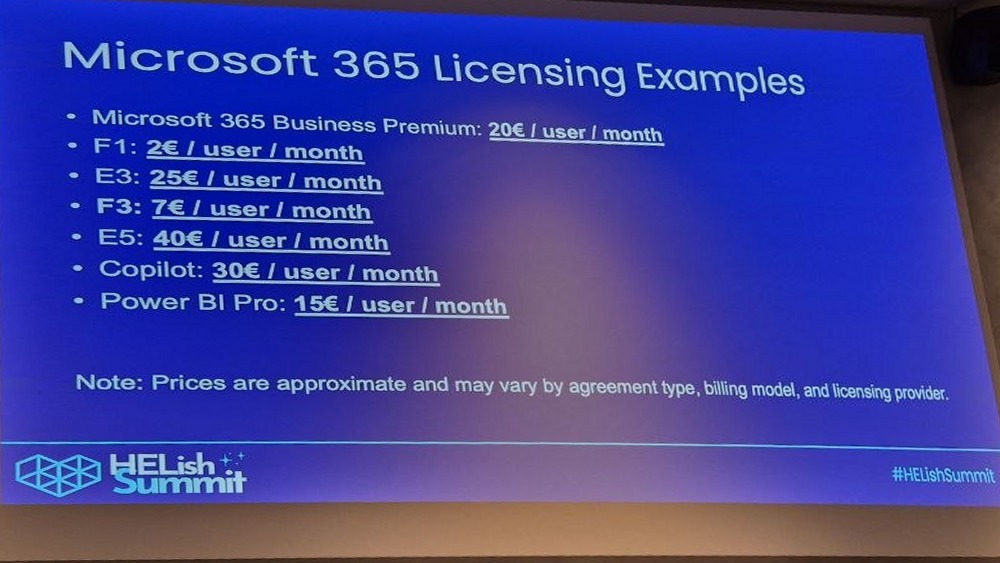
A single E5 at 40 € per user per month is close to 500 € a year per person. The interesting gaps are not between products but between user types: E3 at 25 € against F3 at 7 €, and F1 at 2 € for someone whose working day is a phone. He made the F1 case concretely: a frontline worker who occasionally reads a Teams message or a document does not need an office suite, and F1 still comes with Intune for mobile device management. On the other side, he flagged Copilot, which was expensive when it launched and now has a business version he described as about ten euros cheaper with a cap around 300 users. Below that cap, the saving is immediate and requires nothing but a purchase decision.
He also pointed at overlap. Power BI Pro is included in E5, and organisations still buy it separately.
Where the waste actually sits
The list of places to look was the practical core of the session:
- Inactive users. Accounts with a licence and no sign-in for six months or a year.
- Duplicate licences. More than one licence covering the same services for the same person.
- Shared mailboxes. They are free in Microsoft 365, and he said he sees them licensed with E3 “regrettably often”.
- Service accounts. They do need a licence, but rarely an E5 or E3. An F3 is often enough, and the price gap is large.
- Automation leftovers. An account created years ago for something that has not run since.
His own small company is not exempt. Trial licences, service accounts and subcontractor accounts accumulate, and if nobody cleans them up they roll into the next renewal cycle. That is why he does the inventory annually even for himself.
The ten cent tip
The most quotable practical moment was what he called his ten cent tip: Tony Redmond’s scripts. Eetu called Redmond’s Microsoft 365 books “the M365 bibles” and pointed at the ready-made licensing report script you can download, run and modify. His addition for 2026 is that you no longer need to be a PowerShell person to adapt it, because you can have AI reshape the report into the columns you actually want. He had wanted to demo it live, but every demo he has is in a customer environment and too sensitive to show.
What matters in that report, he said, is the last sign-in column. If an account has not been used in two or three months, you either have someone on long leave or you have a broken HR integration. Most organisations say their HR integration is fine. The report is where you find the accounts that were created around the process and kept their licences after the person was removed from HR.
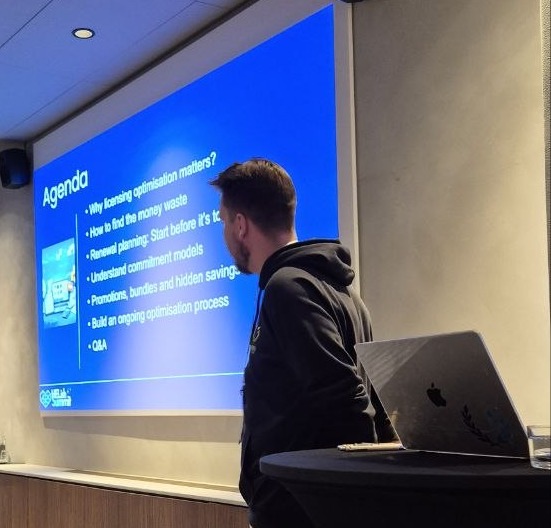
Start one to two months before the renewal
His timing advice was specific. Begin one to two months before the renewal date, because collecting competing offers takes time. Always competitive bid, even when you have a partner you trust, because the incoming offer is what makes the current one move. In larger environments the offers often include funds earmarked for projects, and those are worth asking about.
Then there is the mechanical part people miss. Renewal dates live in the Microsoft 365 admin center under billing, provided you have the rights to see them, and in a large tenant it is a pile: different resellers, different subscriptions, some bought on someone’s credit card, different terms. Auto-renewal needs to be turned off deliberately, either in the self-service portal or by asking the reseller, and if you forget you are locked in again. New subscriptions have a short cancellation window, but he would not rely on it.
Monthly, yearly, three years
The commitment models were the part of the session I had not thought through properly. Monthly commitment is the expensive one, and it is the right one for seasonal and summer workers whose licence count moves up and down. Annual and three-year commitments are cheaper and protect against price increases, and he put the same E5 at 58 € per user per month when the year is paid up front.
The trap is asymmetry. On a multi-year agreement you can always add licences, and you can never remove them. So the optimisation is to commit only to the minimum count you are confident about for the whole term, and buy the rest in shorter cycles. Paying a year up front also needs cash, which is a finance conversation rather than an IT one.
From the questions
The Q&A brought up a cost that sits right next to licensing: SharePoint storage. It creeps up quietly until the indicator turns red, and when a tenant runs out, a large synced library starts failing halfway, some files through and some not. The driver is version history, which by default keeps hundreds of versions of every document and which most people do not know exists. The same commitment trap applies here: if you are planning to clean out ten terabytes, do not lock the storage add-on in for a year first.
The part that makes it a process
He closed with four steps: run the report and see the current state, understand what each user type actually needs, optimise the service and duplicate accounts, and then ask for offers. Most organisations do step four only, and arrive at the renewal with no idea what they need. If the first three are done quarterly or even twice a year, the renewal stops being an elephant you eat once a year in a panic.
That framing is why the session was worth its slot. The savings are real, but the deliverable is a habit.