European Power Platform Conference, Copenhagen | Thursday, July 1, 2026 | Track: Copilot Studio | Level 300
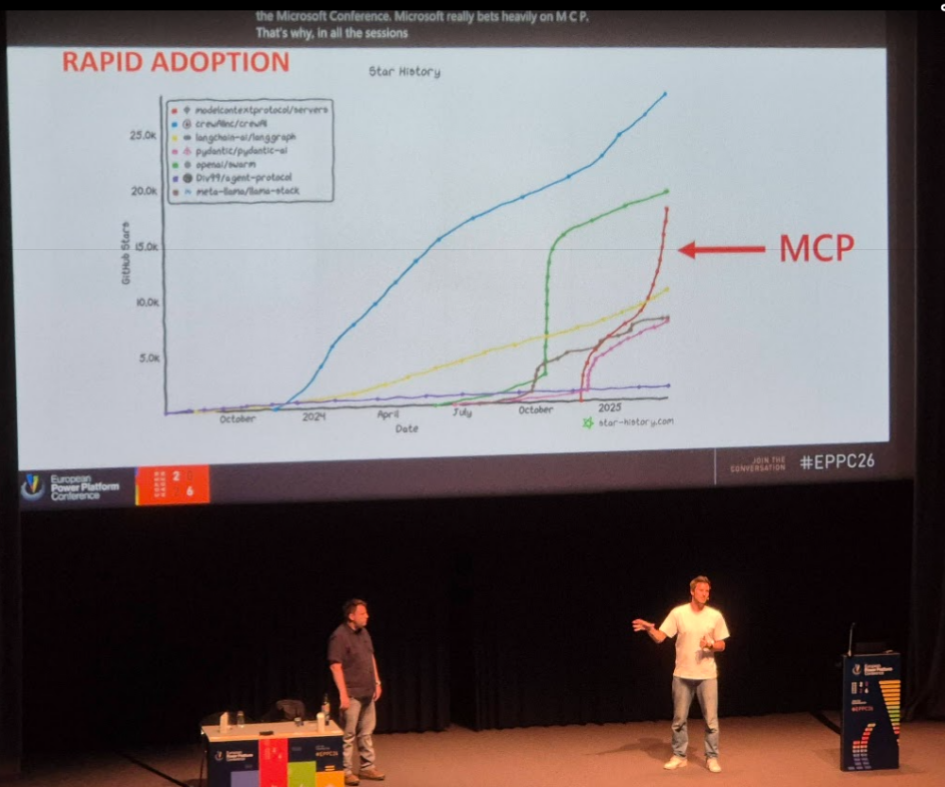
MCP servers are the topic of every conversation at every AI conference in 2026. But for Power Platform professionals, the natural question isn’t “what is MCP?” — it’s “do I replace my connectors with it?” Mats Necker and Daniel Laskewitz gave the clearest answer of the conference: it’s not versus, it’s both — and knowing when to use which is the skill worth developing.
What MCP Actually Is
The Model Context Protocol is a transport layer, not a product. It connects AI hosts and clients — the system where your LLM lives — to MCP servers, which can be almost anything: a remote API, a local file system, a CLI tool running on your machine. The protocol itself is model-agnostic; it doesn’t care whether you’re running GPT, Claude, or a fine-tuned model in Azure AI Foundry.
MCP servers come in two main categories:
STDIO — local servers running on the same machine as the client. Your file system, local CLIs, developer tools. This is where MCP gets genuinely interesting: it’s not just another API integration pattern, it’s a way to give AI access to things that have never been cloud-connected at all.
HTTP/SSE — remote servers, the kind you’d typically associate with API integration. This is what most people think of first, and it’s what Copilot Studio currently supports.
Inside an MCP server, the core capabilities are resources (data and context provided to the model), tools (callable actions that do something — retrieve, create, update), prompts (reusable templates), and the newer apps (UI surfaces that MCP servers can provide). Copilot Studio today works with resources and tools. The rest is on the roadmap.
MCP and Connectors: Complementary, Not Competing
The most useful framing from the session: MCP servers in Power Platform are connectors. When you add an MCP server to Copilot Studio via the wizard, the platform creates a connector in the background. They coexist because they solve slightly different problems.
Where MCP wins:
- Speed of setup: add one MCP server and all its tools are immediately available to the agent. With connectors, you add actions one by one.
- Agentic flexibility: an AI agent can dynamically navigate across MCP tools mid-conversation — if one tool fails, the agent can reason about the error, call a different tool to gather more context, and retry. A fixed connector action chain can’t do that.
- Access to local resources: STDIO MCP servers can expose file systems and CLIs that have no cloud presence at all.
Where connectors still win:
- Multi-product reach: connectors work in Power Apps, Power Automate, Copilot Studio, and Logic Apps. MCP servers today are only in Copilot Studio (with Power Automate support in preview via agent flows).
- Enterprise governance: connectors carry years of built-in enterprise features — Data Loss Prevention policies, virtual network support, a mature certification program, and a rich authentication system. MCP is catching up quickly, but “catching up” means it’s not there yet on all fronts.
- Existing investment: if you already have a connector for a system, you can add an MCP server as an action to that connector rather than starting from scratch.
One pointed observation from the session: when the audience was asked how many were using MCP servers in production, very few hands went up. The governance gap is real, and organisations that have spent years building DLP policies and security posture around connectors are — reasonably — cautious about MCP until the enterprise feature set matures.
The Enterprise Readiness Question
Microsoft’s answer to the governance concern is to route MCP through the connector infrastructure. The certification program — where ISVs can certify their MCP servers and make them available in Microsoft Foundry and Copilot Studio without customers having to build custom connectors — extends to MCP. The DLP engine that governs what connectors can do applies to MCP servers wrapped in connectors.
Authentication was notably absent in early MCP implementations (one of the session’s jokes: “MCP stands for security, because there wasn’t any”). That’s changed. A new MCP specification with expanded authentication support was expected by the end of the month.
The practical advice: follow the MCP specification directly, not just what individual clients like Copilot Studio support today. What’s in the spec today tends to become what’s in the platform in six to twelve months. Knowing what’s coming is its own kind of preparedness — and the speaker suggested grabbing Microsoft people at conferences like this one and telling them what MCP features matter to you. They’re actively collecting that feedback.
The Power Platform CLI Demo
The most concrete demonstration was the Power Platform CLI MCP server — a STDIO server that wraps the pac CLI in a natural language interface.
The pac CLI is powerful and genuinely complex. Commands for environment management, solution import/export, group administration, DLP policy inspection, backup and restore — the surface area is large and the parameters are precise. Most functional consultants and even many developers don’t use it confidently because the cognitive overhead of the exact syntax is too high.
With the MCP server added to GitHub Copilot in VS Code, Daniel showed how to drive the same operations through plain English. Type “which authentication profile is currently active?” and the MCP server figures out which tool to call and what parameters are needed. If context is missing, it asks. The CLI knowledge is still there — it’s just no longer a prerequisite for using it.
The broader point this illustrates: MCP’s most underrated quality is lowering the barrier to powerful tools that were previously only accessible to those who knew the syntax. That’s not just a developer productivity story; it’s a change to who can operate infrastructure.
What to Take Away
The Power Platform has a connector ecosystem built over years. MCP doesn’t replace it — it extends it, and in some cases works through it. The practical decision framework:
- Already have a connector? Add MCP server as an action to that connector. Reuse the governance you already have.
- No connector, need Copilot Studio integration only? MCP server is the faster path — add it, get all tools immediately.
- Need Power Apps or Power Automate support too? Build a connector, or wait for MCP support in those products to mature.
- Working with local tools, file systems, or CLIs? STDIO MCP servers open possibilities that connectors never could.
- Enterprise governance is a hard requirement? Stay closer to connectors for now, or wrap MCP in connector infrastructure until the certification and DLP story fully closes.
The real skill is knowing when each tool is the right one. That judgement — rather than mastery of any single integration pattern — is what becomes increasingly valuable as both MCP and connectors keep evolving.
Session: “Model Context Protocol vs. Connectors” — EPPC26, Copenhagen, July 1, 2026
Presenters: Mats Necker (dhino) · Daniel Laskewitz (Microsoft)