Which agent tool should we use? Copilot Chat, Agent Builder, Copilot Cowork or Copilot Studio, and inside Copilot Studio you now choose a harness when you create the agent. There are several, and for an internal process like this two matter: the standard harness and the Microsoft Copilot harness (formerly the GitHub Copilot harness). The feature lists don’t help much, because they overlap more every month. So I stopped comparing features and took one real job instead: the monthly Microsoft 365 licence review. Find the E5 users who have only used email for 90 days, propose them for F3, and get the budget owner to approve it. Then I walked that same job through all five tools on paper, from the simplest to the most capable.
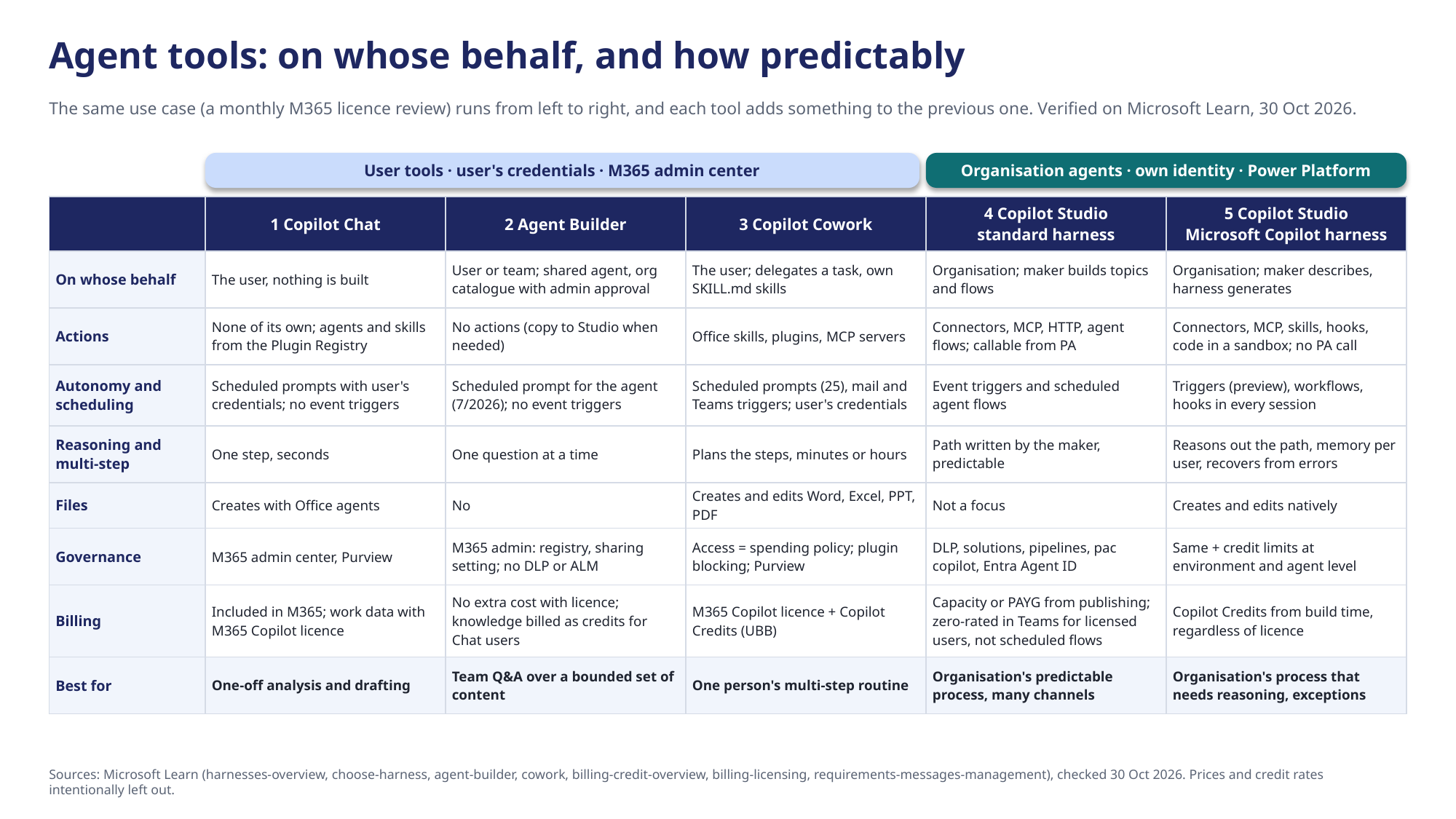
The table is long, but you only need two of its rows to make most decisions.
The first question is whose credentials the agent runs on
Copilot Chat, Agent Builder and Cowork always act as the user. They run with the user’s permissions, they start when the user starts them or on a schedule the user set, and they are governed in the Microsoft 365 admin center. The Copilot Studio harnesses build organisation agents. They have their own identity, their own publishing, DLP and ALM in Power Platform, and they can wake up without anyone at the keyboard.
You might say that Cowork can also run on a schedule and react to incoming mail, so it is autonomous too. It is, but on one person’s credentials and one person’s credits. That is the whole difference for a process like the licence review. When the person who set it up goes on holiday, the process stops, and nothing about the decisions ends up in a shared history the organisation owns.
The second question is who writes the path
Inside Copilot Studio the line runs somewhere else. The standard harness runs the path the maker wrote: topics, variables, tools and flows. The Microsoft Copilot harness reasons the path itself. It splits a goal into steps, keeps memory across sessions and recovers from errors, and its route through a task is less predictable.
Microsoft’s own harness guidance puts the trade-off plainly. Use the reasoning harness on a simple case and you pay for reasoning, latency and credits you didn’t need. Use the standard harness on a complex case and you end up hand-writing a growing pile of exception logic. That gives me the one question I now ask before anything else.
Does this agent need reasoning or discipline?

Same job, five tools
Here is how the licence review changes as it moves to the right.
Copilot Chat answers. A licence admin uploads last month’s usage report and asks who are the F3 candidates. The answer is good, but it is one-off. Nothing is remembered, nothing is sent, and next month the admin starts again.
Agent Builder answers the same way for everyone. The admin writes the rules once as instructions (what counts as an F3 candidate, which groups are never proposed) and points the agent to the SharePoint folder where the reports land. The whole team gets the same answer with the same rules. But Agent Builder doesn’t support authoring actions. It cannot fetch data from Graph, ask the budget owner anything, or remember last month. When it needs actions, you copy it to Copilot Studio.
Cowork does the job for one person. The admin delegates the whole round: fetch the newest report, build an Excel of candidates per department, draft an email to each budget owner, and do this on the first of every month. Cowork plans the steps, builds the Excel and asks before it sends anything. The approval can be widened: only to this recipient, only to this domain, or always allow, but only for the current session, and the admin can revoke it in the permissions panel. A scheduled task drafts and waits for approval by default, unless the admin pre-authorises it when creating the task. It is a real assistant, and it still belongs to one person.
The standard harness does it for the organisation, predictably. An agent flow on a recurrence trigger fetches licence and sign-in data through the Graph connector, calculates the candidates deterministically, writes the rows to Dataverse, sends an approval request to the budget owner and posts the result to a Teams channel. The same input gives the same output, DLP limits the connectors, and the solution moves from dev to test to prod. A scheduled flow like this consumes Copilot Credits at the standard rate, because nobody is talking to the agent when it runs. Then a budget owner replies that this person is on parental leave, please don’t touch the licence, and you need a topic for that. And another one for the next exception.
The Microsoft Copilot harness reasons about the exceptions. It takes the candidate list and checks each name against HR absence data, last month’s decisions and project calendars. It explains why three names are not candidates and writes a Word justification with an Excel attachment for the approver. A pre tool use hook can stop a removal proposal for a protected group before it is made. But Microsoft’s own hooks documentation says not to rely on a hook as your only safeguard, because a hook that fails lets the action through. The real wall is that the agent’s account has no right to change licences for protected groups in the first place. The price is different too: credits are consumed from build time and evaluations onward, for all usage regardless of the user’s licence, as the billing page describes, and there are fewer channels than in the standard harness.
The realistic build is not any single one of these. It is four and five together: a deterministic workflow for fetching, writing and approval, and a reasoning agent for the exceptions. One detail decides how you join them. The two harnesses cannot call each other as agents, and the Copilot Studio connector in Power Automate does not support the Microsoft Copilot harness. The join is an agent node in a Copilot Studio workflow, or shared data in Dataverse that both sides read and write. Microsoft names accounts payable reconciliation (read invoices, match them to purchase orders, route exceptions for approval) as a fit for the Microsoft Copilot harness. As I read it, that is the same shape as the licence review: a fixed path with a reasoning step for the cases that don’t fit.
The choice is made when you create the agent
One detail is easy to miss. The harness is chosen when the agent is created. Moving an agent from the standard harness to the Microsoft Copilot harness is not a setting. There is now an upgrade in preview: you ask Copilot Studio to upgrade the agent, and it makes a new copy that keeps the instructions, tools and suggested prompts, turns topics into skills or workflows, and gives you a report of what changed. Knowledge sources, Power Fx and child agents do not carry over, and the upgrade itself consumes credits. Microsoft’s own advice is to treat it as re-architecture, not a switch. So the reasoning or discipline question still belongs at the start of the project, not after the first demo.
Where they overlap
Three pairs are closer than the product names suggest.
- Agent Builder and the Copilot chat experience in Copilot Studio are the same kind of declarative agent through two doors. You can copy an Agent Builder agent to Copilot Studio when it needs actions.
- Cowork and the Microsoft Copilot harness share most of their capabilities (planning, skills, MCP, files, scheduling, approval) and the same currency, Copilot Credits. Cowork is one person’s agentic system, the harness is an agent the organisation publishes.
- The standard and Microsoft Copilot harnesses share knowledge sources, connectors, MCP and admin center governance. They share sources, but not a call path: you combine them through a workflow or shared data, not by one agent calling the other.
Autonomy or price
Billing is where the two axes meet. The Microsoft 365 Copilot licence covers Chat and Agent Builder for licensed users. Copilot Credits cover Cowork and the Microsoft Copilot harness. The standard harness sits between them, and its zero rating is conditional: a licensed user, talking to the agent with their own identity in Microsoft 365 channels such as Teams, for internal use within fair use. An agent flow is free only when it is called by the agent through the “When an agent calls the flow” trigger while a licensed user is talking to it. A recurrence trigger or an autonomous run is billed at the standard rate. So the licence review’s monthly flow costs credits even when every budget owner has a Copilot licence.
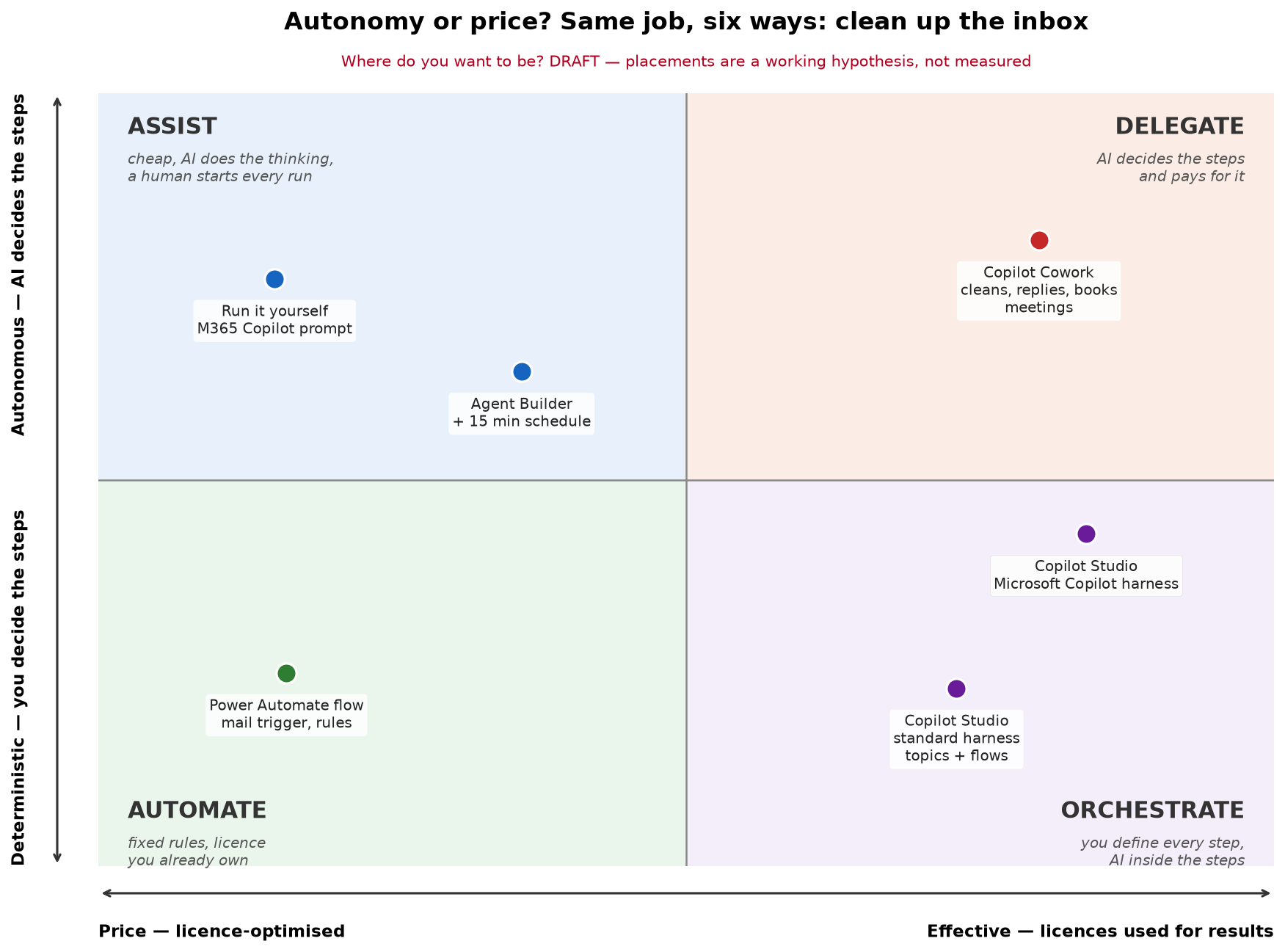
The quadrant puts this as a choice, with a different everyday job: cleaning up the inbox. On the left you optimise for price and use the licence you already own. On the right you use licences for results. Up means the AI decides the steps, down means you decide them. The shape is the useful part. Every tool on the right buys autonomy or discipline with money, and the question is only which one this job needs.
If a licence review runs on a credit-billed agent whose credits cost more than the licences it frees, it has defeated its own purpose. A licence review that runs on one admin’s Cowork stops the week they leave. The right tool is the one that matches the job on both axes, and most jobs need less autonomy than the demo suggests.
An instruction is a request, a missing permission is a wall
The licence review shows three layers of control. A rule in the instructions holds only as long as the agent reads it right and remembers it in a long task. A hook runs every time, but if it fails, the action goes through. A permission the agent never got holds always. That is the same lesson we learned running our own AI agents. In episode 4 of our Armandiel AI series we show how we decide what our agent is allowed to touch, from reading a mailbox without the right to send as its owner to the key mistake we made ourselves: What should your AI be allowed to touch? Accounts, keys and permissions.
The rest of the series is on youtube.com/@ArmandielAI.