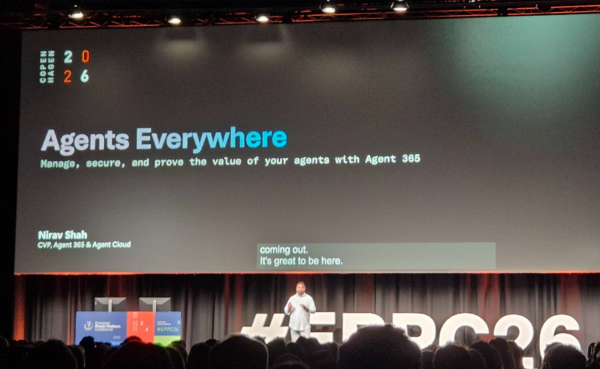

If Day 1 of EPPC26 was about building agents, Day 2 was about what happens after you build them. Nirav Shah, Microsoft Corporate Vice President, opened Thursday’s keynote with a striking statistic: over 90% of organisations are already running AI agents, but only 10% have a strategy for managing them. The answer is Agent 365 — a unified control plane for every agent, wherever it was built.
The Governance Gap Nobody Talks About
The democratisation of agent building succeeded brilliantly at the creation side — but it created a sprawl problem. Agents appear from business users, from IT teams, from SaaS vendors, from developers running local tools. They touch critical business data. They operate with real permissions. And in most organisations, nobody has a clear picture of what they are, who owns them, or what they’re doing.
Nirav’s framing: we democratised creation, but we never democratised control.
What Agent 365 Actually Is
Agent 365 is not a new product to learn from scratch. It’s an extension of the security and management infrastructure organisations already use — Entra ID, Microsoft Defender, Microsoft Purview, Intune — now extended to cover agents the same way it covers users, devices, and applications.
The control plane has three layers:
- Observe — a unified registry and activity log for every agent across the organisation
- Govern — lifecycle management: owner assignment, policy templates, approval workflows, agent retirement rules
- Secure — enforcing agent identity (Entra), access rights, and data protection (Purview)
Agent 365 lives in the Microsoft 365 Admin Center, under a new Agents section.
A Tour of the Agent 365 Admin Center
The overview page answers four questions: How many agents do we have? Who’s using them? What are the most popular ones? And what is the agent runtime (the ROI metric)?
Alongside sits a homework section — three action queues:
- Pending approvals — agents submitted for publishing, waiting for IT sign-off
- Agents at risk — flagged by Defender or Purview with security or compliance concerns
- Ownerless agents — agents whose creators have left the company
The Agent Map was a standout: a visual graph showing all tools an agent has access to and how many exceptions each tool call generated. In the demo, a single “simple” agent was connected to 24 different tools — a common wake-up call for admins.
Automation at Scale: Rules and Policy Templates
Agent Management Rules work like Outlook rules for agent lifecycle. A pre-built rule automatically reassigns ownerless agents to the creator’s manager. Custom rules are coming soon.
Policy Templates let admins define standard lifecycle policies — such as taking agents offline after 90 days of inactivity — and apply them at scale.
KPMG: 72,000 Agents and Counting
Marco, Global Microsoft Technology CTO at KPMG, shared what happened when KPMG first enabled Agent 365: they discovered 72,000 agents already running. Nobody had that number before. Today KPMG is adding 4,000–5,000 new agents per week and has crossed 130,000 total.
Agent 365 was described as the “missing piece” — KPMG had the AI framework and Copilot Studio deployments, but no single pane of glass for visibility. Their key insight: agent management is a team sport — IT, security, data governance, compliance, and the business itself working together.
The Shadow AI Problem: 29% of Employees
29% of employees are already using unsanctioned agents to get their work done — not out of malice, but because they found something that made them more effective.
Local agents — OpenAI local clients, GitHub Copilot running on-device, coding agents — run as the local user, bypass cloud policies, and leave almost no distinguishable trace. Agent 365 now addresses this:
- Local Agent Registry (via Defender): automatically discovers which local agent platforms are installed on managed devices — GitHub Copilot, Open Claude, and others — with device-level detail and security posture.
- Shadow AI Discovery and Policy (via Intune + Defender): continuous scanning of managed devices surfaces where unsanctioned tools are installed. When an organisation decides a tool is not approved, Agent 365 creates an Intune policy to block it at the device level.
- Registry Sync: connect third-party platforms like Salesforce AgentForce so their agents are also pulled into the registry.
The key message: the answer isn’t to panic and ban everything — that pushes it deeper into the shadows. Discover. Assess. Decide.
Cost Management and Proving ROI
The final section addressed “tokenomics” — two genuinely important questions: What are we spending, and is it worth it?
Agent 365 now includes Cost Management:
- Spending limits at tenant and user level
- Departmental chargebacks via separate billing subscriptions
- Alerts when budgets approach thresholds
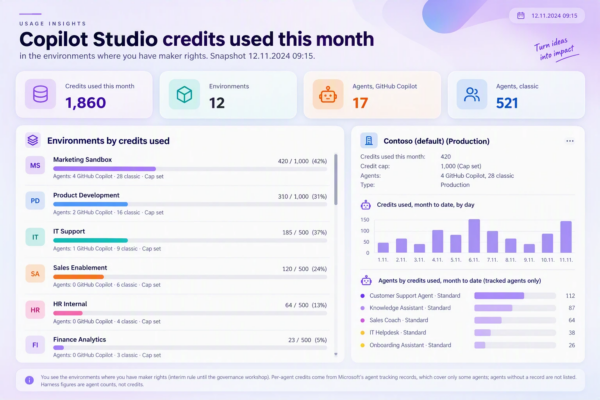
ROI is calculated per agent: value per session (based on research-backed productivity multipliers) multiplied by total sessions, compared against credit spend. For business and finance leaders who won’t enter the M365 Admin Center, the same data surfaces in Viva Insights — leader-facing dashboards with cost-to-productivity connections. Co-Pilot Work and GitHub Copilot have both moved to usage-based billing, making these dashboards immediately relevant.
Takeaways
The Thursday keynote made the governance conversation concrete and technical. The headline: every organisation already has an agent sprawl problem. The question is whether you’re choosing to see it.
- Agent 365 is in the M365 Admin Center now — the single control plane for Microsoft and third-party agents
- Start with visibility: registry, active users, agent runtime
- Use lifecycle management rules and policy templates to govern at scale
- Shadow AI is real: 29% of employees use unsanctioned tools; Agent 365 + Intune can discover and block them
- Cost management closes the loop — budgets, chargebacks, and per-agent ROI in one place
- KPMG’s lesson: treat agent management as a team sport — IT, security, compliance, finance, and the business together
Session: “Agents Everywhere: Manage, Secure, Prove Value with Agent 365” — EPPC26, Copenhagen, July 1, 2026
Keynote speaker: Nirav Shah, Corporate Vice President, Microsoft
Demos: Dona Sarkar, Kendra Springer, Shelby (Microsoft) · Customer: Marco, Global Microsoft Technology CTO, KPMG