
European Power Platform Conference, Copenhagen | June 30, 2026 | Track: Copilot Platform Power Apps | Level 300
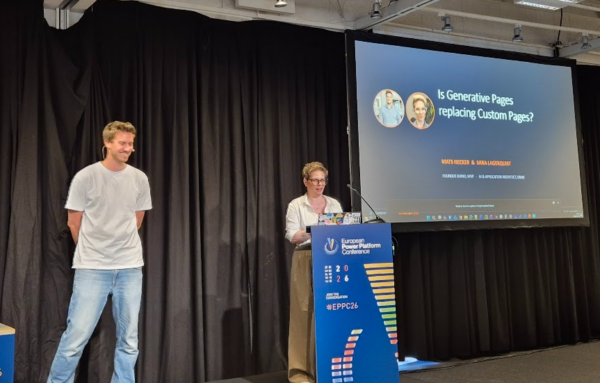
One of the most hands-on sessions at EPPC26 tackled a question that’s been buzzing through the Power Platform community: are Generative Pages (Gen Pages) about to make Custom Pages obsolete? Mats Necker from dhino and Sara Lagerquist from CRMK brought real-world experience to the stage — and the answer turned out to be more nuanced than the hype suggests.
Setting the Scene: The Power Platform App Paradigms
Before diving into the debate, the speakers mapped out the full landscape of application paradigms available today in Microsoft Power Platform:
- Custom Pages — the bridge between pixel-perfect Canvas apps and model-driven apps. Great for wizards, custom dialogs, and complex UX patterns inside Dynamics 365. They support multiple data sources via connectors and remain fully functional today.
- Generative Pages (Gen Pages) — pages described in natural language and generated as React apps, embeddable inside model-driven apps.
- Code Apps — standalone React/TypeScript apps built in VS Code and deployed to Power Platform as a secure host. Best for net-new standalone applications.
- write.powerapps — a web-based, prompt-driven experience that generates Code Apps.
- Microsoft 365 Copilot “apps” — SharePoint list-based mini-apps, best suited for personal productivity.
Two Ways to Create a Generative Page
This was one of the session’s most valuable clarifications: there are two fundamentally different methods for creating Gen Pages, and they are not equal.
UI-Based Designer (Maker Portal)
- Currently in preview, available only in select regions (US, Canada, Australia)
- Uses a retired GPT-4.1 model with no option to switch
- Every change triggers a full page regeneration — slow and unpredictable
- No version control beyond a basic undo
- Generated UIs are often aesthetically lacking
- No way to enforce company-specific design standards
Code-Based Creation (VS Code)
- Generally Available (GA) worldwide
- Uses VS Code with the Power Platform Skills plugin and GitHub Copilot
- An AI agent creates wireframes for review before generating code — a more controlled, conversational workflow
- Full source control and versioning via a code repository
- Supports custom agents (e.g., from Scott Durrow’s open-source repo) to enforce best practices
- Lets you bring your own, more powerful AI models
The verdict from the session: the UI designer is the “flashy intro,” the code-based approach is the “senior, trusted path.”
Key Limitations of Generative Pages
Gen Pages come with real constraints that you need to factor in before adopting them:
- Dataverse only — no support for other connectors or data sources
- No multi-select choice columns
- Single app binding — a Gen Page is tied to one model-driven app and must appear in the site menu; it cannot be hidden like a Custom Page
- Reuse requires duplication — using the same page across multiple apps means copying it
- Form embedding not supported — use PCF components for that use case
- Single-maker editing — only one person can edit a page at a time
- Restricted npm packages — enhances security but limits flexibility
Live Demo: Pottery Order Tracking
Mats walked through a concrete example: a model-driven app for tracking pottery items through production stages. The pain point was associating multiple glazes with a single item — a many-to-many relationship that required too many clicks in the standard UI.
A Generative Page solved this by providing a streamlined interface for adding multiple related glaze records at once. Simple, practical, and exactly the kind of UX enhancement Gen Pages are designed for.
Best Practices from the Session
- Prompt with images — include a screenshot of your desired UI to guide styling and layout
- Read the agent reasoning — check the “agent thoughts and summaries” to improve future prompts
- Test with MCP Playwright — automate UI testing directly in VS Code: navigation, click flows, screenshots
- Deploy with Packer CLI — use it to create pages, add them to the sitemap, and manage them as solution components
- Plan before generating — take advantage of the code-based workflow’s planning phase to review wireframes before committing to generation
So, Is It Replacing Custom Pages?
Short answer: not yet, and not entirely.
Mats and Sara’s recommendation was clear:
| Scenario | Recommendation |
|---|---|
| New UI inside a model-driven app, Dataverse only | Prefer Gen Pages (code-based) |
| Multiple data sources beyond Dataverse | Keep Custom Pages |
| Existing, working Custom Pages | Don’t refactor unless adding major new functionality |
| Embedding on a form | Use PCF |
Custom Pages are mature, stable, and still the right tool in several scenarios. Gen Pages — especially via the code-based approach — are faster for new builds and offer superior AI-assisted iteration. The two can coexist.
Takeaways
EPPC26 made it clear that Generative Pages are a genuine step forward for model-driven app development, but the UI-based designer is not production-ready. If you want to adopt Gen Pages seriously, set up VS Code with the Power Platform Skills plugin and start experimenting with the code-based workflow. The tooling is GA, the iteration loop is fast, and the quality gap over the Maker Portal is significant.
Custom Pages aren’t going anywhere — but for new Dataverse-centric UI work inside model-driven apps, the code-based Gen Page is now the path to consider first.
Session: “Is Generative Pages Replacing Custom Pages?” — EPPC26, Copenhagen, June 30, 2026
Presenters: Mats Necker (dhino) · Sara Lagerquist (CRMK)