
Three months ago I wrote about setting up a Linux box on Azure to develop Copilot Studio with Claude Code. That post ended where the machine was ready, which is exactly where the interesting part starts.
This is what happened next. The machine went into use on 14 April 2026. Today it holds 41 project folders and 15 git repositories: nine Copilot Studio projects, Power Automate work, Canvas and model-driven apps, three Flutter apps, three native Android apps, and a few things that have nothing to do with Microsoft at all.
None of that is the point. The way I work changed more than the tooling did, and the tooling only makes sense in that order: the practices first, the toolkit second, the honest limits last.
Part 1: Five practices
Everything below is anchored to a file or a command. That’s deliberate. “AI helps with documentation” is not a practice; a file that gets read first and written last is.
1. Every project folder has a log.md
This is the single highest-value habit I’ve picked up, and it took me embarrassingly long to make it consistent.
A coding agent has no memory of yesterday; every session starts cold. If the state of a project lives only in the conversation, it dies with the conversation, and you spend the first twenty minutes of the next one re-explaining what you decided last week.
So every project folder has a log.md. It records what was done, what’s still open, what was decided and why. It’s the first thing read at the start of a session and the last thing written at the end. Not a changelog, since git already does that. A decision log: the reasoning that isn’t recoverable from the code.
The test of whether it’s working: I can open a project I haven’t touched in three weeks, and the agent can tell me what the next step is before I do.
2. A project map, and rules per context
Forty-one folders is past the point where “I’ll remember which is which” holds. There’s a map file that says what each folder is, and, more importantly, what’s allowed in it.
Some of that work is client work, some is personal try-outs. Different contexts mean different identities, different permitted connectors, and data that must never mix. Getting that wrong is not the kind of mistake an undo fixes. So the rules are written down rather than assumed: which identity applies in this folder, which connectors are permitted, which are forbidden outright.
One of those rules is about the machine itself: the context a folder belongs to decides which identity may be used from it, and nothing crosses between them. Development and staging work is the daily loop. Anything that touches a live environment is a separate, deliberate step rather than a side effect of a session, and it carries its own check before anything moves.
This sounds bureaucratic for a one-person setup. It isn’t. It’s what makes it safe to say “go ahead” without reviewing every single action.
3. Persistent memory across sessions
Separate from project state, there’s a memory of how I want to work. Corrections I’ve made once and don’t want to make again.
A concrete example. Copilot Studio work has an order that has to be respected:
pull → edit → push → publish → git
Pull the current state from the cloud first. Edit locally. Push the agent content to Copilot Studio. Publish it so the draft goes live. Only then commit to version control.
Get that order wrong and nothing explodes, which is the problem. Skip the pull and the next push dies on a version mismatch, because the local row versions are stale. Do the git push first and your repository now claims a state the cloud has never seen. Both failures are quiet.
I explained that order once. It’s written down. I haven’t had to explain it again.
4. Verify with a diff, not with the result
This is the practice that separates “the agent did something” from “the agent did the right thing.”
Before a risky change, take a snapshot. After the change, diff it.
pac env fetch -xf connectionrefs.xml > before.txt
# ... make the change ...
diff <(sort before.txt) <(sort after.txt)
The expected result is an empty diff, or exactly the one line you intended to add. Anything else, you stop.
I use this specifically around connection references, because that’s where I’ve seen a tenant break: a solution import once shortened a connection reference’s logical name, created a new one, deleted the old, and a second solution that shared it silently stopped working. Ten seconds of diffing replaces an hour of wondering.
The same principle applies to flows. Before writing a definition back, I compute the diff and read it: how many actions changed, and did any connection reference move? If the answer to the second question isn’t “none”, I don’t press enter.
And a warning worth its own paragraph: “Succeeded” does not mean “delivered.” I had a scheduled flow that reported success every week for over a month. It called an agent through a fire-and-forget action: posts a prompt, returns in under a second, never waits for the agent to finish. The agent was hitting a context limit and dying before it reached the final step. Green run history, nothing delivered. The only way I found it was comparing two numbers: the trigger had run six times, the flow that does the actual work had run once.
If your automation hands work to an agent, the trigger’s history is not proof. Check the last step in the chain.
5. The human does what needs eyes
There’s a clean line, and it hasn’t moved much in three months.
The agent gets what is repeatable and verifiable: diffs, bulk edits, log analysis, querying several environments, documentation, anything with a deterministic check at the end.
I keep what needs judgment or eyes: screenshots, device testing, app store forms, choosing an image, deciding whether something is ready to publish. Not because the agent couldn’t attempt them, but because there’s no way to verify the result without looking, and an unverifiable step is where the trouble starts.
Part 2: The toolkit, and the order it arrived in
Here’s what actually landed on the machine, and when. The order wasn’t planned. Each one removed a specific blocker.
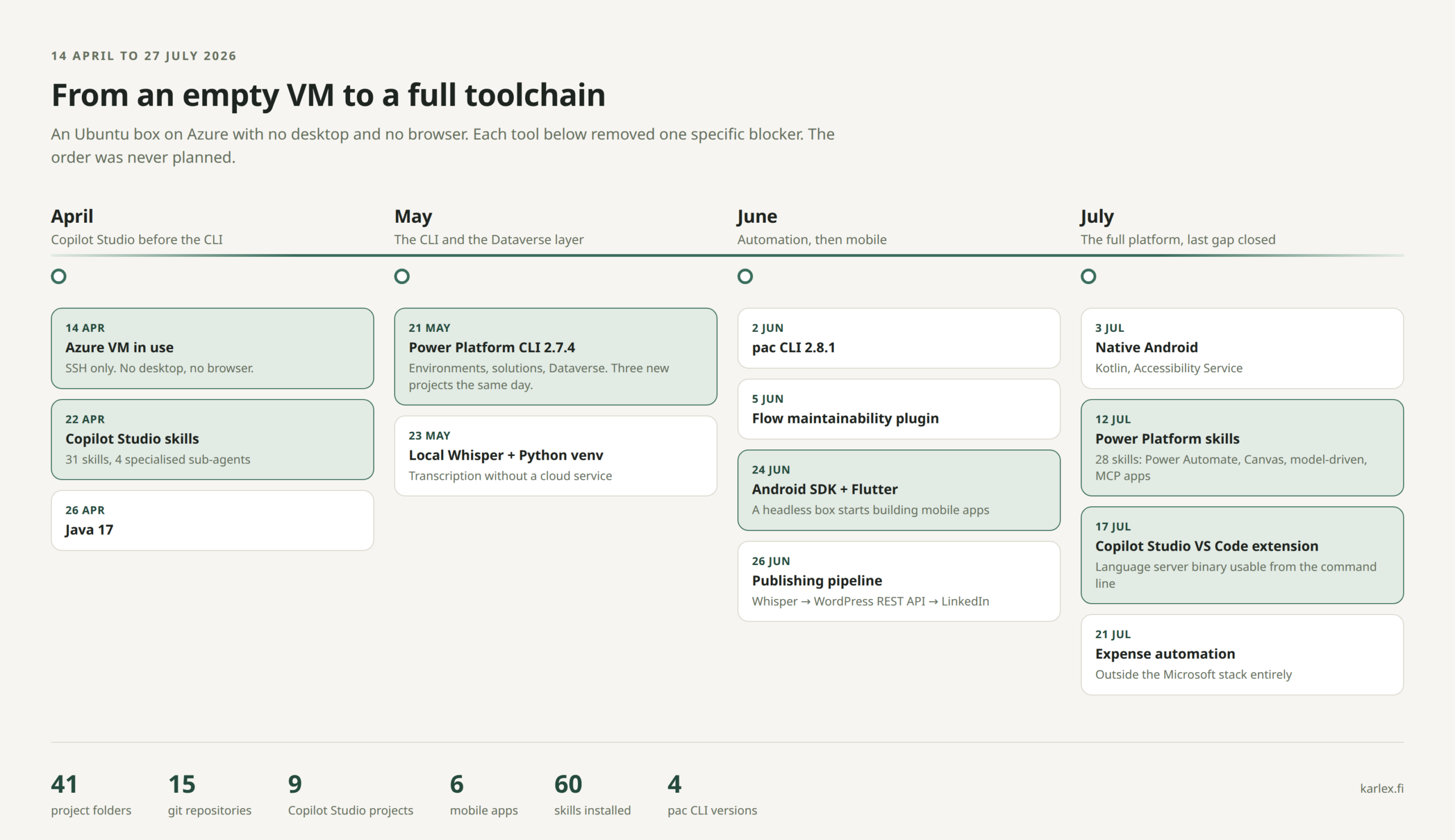
April: Copilot Studio before the CLI. Eight days after the machine came up, the first thing installed was Microsoft’s Copilot Studio skills package: 31 skills and four specialised sub-agents for authoring, review, lifecycle and testing.
Note what’s not there: the Power Platform CLI didn’t arrive for another month. That first month went into learning through the skills what an agent actually is as a set of files (the YAML, the topics, the knowledge sources), before I had any tooling to push those files anywhere. In hindsight that was the right order: learn the shape of the thing before you automate it.
May: the CLI and the Dataverse layer. pac CLI 2.7.4 on 21 May, and the same day three new project folders appeared. The tool opened a dam.
The realisation that month: Dataverse is an interface, not a screen. Once that lands, a large share of maker-portal clicking turns into queries you can script and repeat.
Also in May, and unrelated to Microsoft: local Whisper for transcription. Worth mentioning precisely because it doesn’t fit: the box had stopped being a Power Platform terminal and become a general development machine.
June: automation, then mobile. More Power Platform through the first half. Then, on 24 June, the Android SDK and Flutter.
A headless VM with no display started building mobile apps: three Flutter projects within three days. What works: writing code, resolving dependencies, building, signing, producing an APK. What doesn’t: an emulator without a screen, or anything that requires seeing the device. So the loop became build on the server, install on a real phone, diagnose through log files the app writes itself, because adb isn’t always available on a managed device.
June also produced the publishing pipeline that puts these posts out, which has its own write-up and doesn’t need repeating here.
July: the full platform, and the last gap closed. Native Android arrived in early July: three Kotlin projects using Android’s Accessibility Service, a step down from cross-platform frameworks into the platform’s own APIs.
On 12 July, Microsoft’s broader Power Platform skills package: 28 more skills and MCP servers covering Power Automate (around sixty tools for building, running and debugging flows), Canvas app authoring, model-driven generative pages, and MCP app development. This was the point where the whole width of the platform reached the command line, not just Copilot Studio.
On 17 July, the Copilot Studio VS Code extension. The detail that matters: it ships a language server binary that can be driven directly from the command line. Same engine as the extension’s push and pull buttons, no UI required. That closed the last significant gap.
And on 21 July, something entirely outside the Microsoft stack: receipt and expense automation. Email receipts in, per-diem rows derived, a spreadsheet in cloud storage, entries into an accounting service. Worth including precisely because it isn’t Power Platform: the same working method transferred to ordinary paperwork without modification.
One consequence of all of this living on a server rather than a laptop: an unfinished session doesn’t have to wait for me to be back at a desk. If something is left half-done when I stop for the day, I can pick it up from my phone over a remote connection to the same machine, see where it got to and let it run to a proper stopping point. It isn’t where I’d write anything substantial. It’s enough to keep a job from sitting idle overnight.
Three routes into the same cloud
The most useful thing I’ve learned about this toolkit is that its parts are not alternatives.
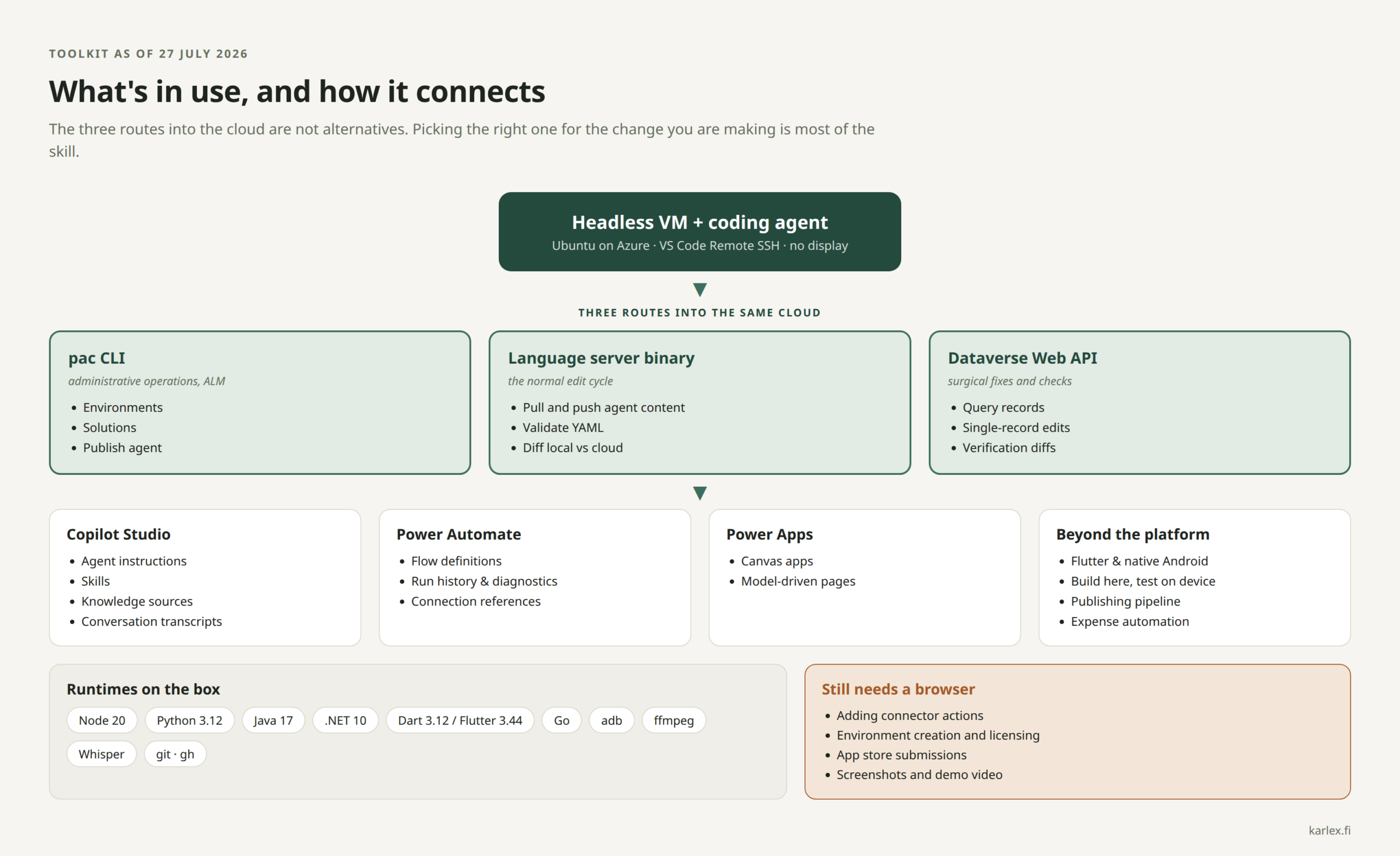
| Route | What it’s for | When I reach for it |
|---|---|---|
| pac CLI | environments, solutions, publishing | administrative operations, ALM |
| Language server binary | agent content | the normal edit cycle: pull, edit, push |
| Dataverse Web API | individual records | surgical fixes, queries, verification |
Picking the right one for the change you’re making is most of the skill. A surgical single-record fix through a solution import is how tenants break. A routine content edit through the raw API leaves your local workspace stale.
One trap while you’re learning them: a flow has two different GUIDs. The Dataverse workflowid is not the runtime ID used by the portal URL and the run history. Query with the wrong one and you get a confident 404 that means nothing at all. I lost time to that twice in one day.
For versions, as of today: pac CLI 2.6.4 active on .NET 10, the Copilot Studio extension at 1.6.68, Node 20, Python 3.12, Java 17, Dart 3.12 with Flutter 3.44. Four different pac CLI versions have passed through the machine in three months, which tells you something about the pace.
Part 3: What still needs a browser
I want to be straight about this, because a post like this drifts into sales material if you let it.
Still the browser, every time:
- Adding a connector action to an agent
- Creating environments and handling licensing
- App store submission flows
- Screenshots and demo video
- Anything where a human has to look at a screen to judge the result
These aren’t tooling gaps I expect to close with a clever script. Parts of the platform simply haven’t been published as APIs, and pretending otherwise just produces brittle automation that breaks on the next UI change.
Part 4: What I evaluated and didn’t add
What got rejected says as much as what stayed.
The clearest recent example: code knowledge graph tools. The idea is sound. You parse the codebase once into a graph of what imports what and what calls what, and the agent traverses that graph instead of re-reading files from scratch every session. Reported savings are large, up to 70x on token cost, and the good ones are open source and run entirely on your own machine.
I measured before deciding. These tools are honest about their own threshold: somewhere around 500 files, below which building the graph costs more than it saves. So I counted. My largest real source tree is 222 YAML files. Two folders do exceed 500 files, but that count is assets and dependencies: the actual code inside them is 17 and 36 files. Not one of my projects has the problem the graph solves.
The second reason is the more interesting one. The problem those tools address, an agent rebuilding its understanding of a large unfamiliar codebase at the start of every session, is a version of the same problem log.md addresses. A call graph tells you what calls what. A decision log tells you why, and why is the part you cannot recover from the code. At the size I work at, the cheaper artifact wins.
I’ll revisit this the day I inherit someone else’s large codebase. Blast radius analysis over a real graph would pair well with the diff habit in Part 1. Until then it would be tooling I maintain rather than tooling that pays. A 70x number is a claim about someone else’s codebase; the only way to know whether it’s a claim about yours is to count your own files first.
What actually changed
Not speed. I’d have guessed speed three months ago, and it’s the wrong answer.
What changed is verifiability. Every change now leaves something behind: a diff that shows exactly what moved, a timestamp, a log entry explaining why. When something breaks, there’s a trail. When someone asks why a decision was made, the answer is in a file rather than in my memory of a Tuesday afternoon.
Clicking through a portal leaves none of that. That’s the part I’d struggle to give up now, more than any individual tool in the list above.