When I start on a new Power Platform project, my first question to the customer is not about the backlog. It is this: is it ok if I do this agentically? My customers have approved the Anthropic models, so the model itself is rarely the problem. The real question is what the agent can reach, and that question has more than one answer.

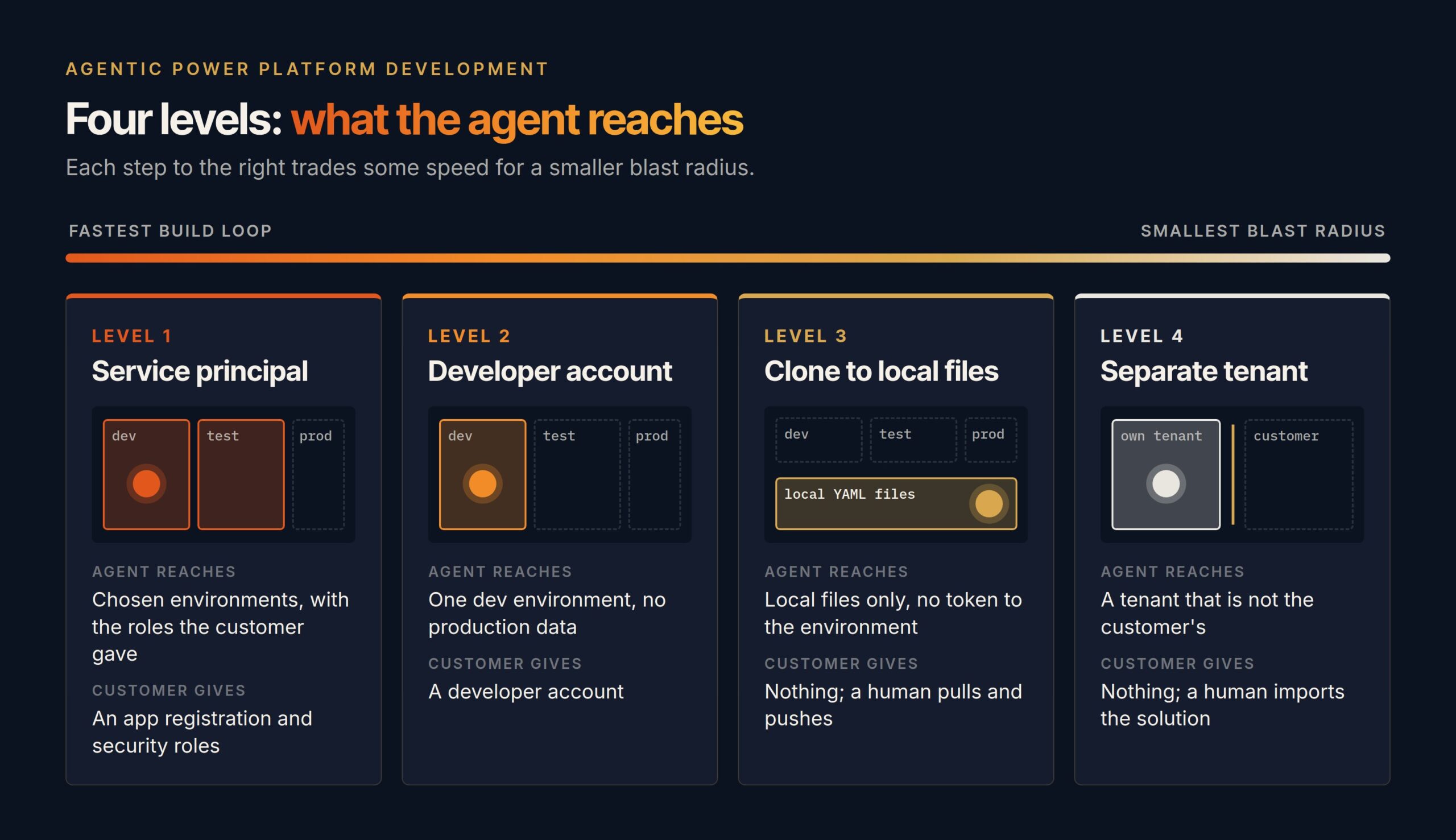
The usual reaction from a security team is fair: an AI agent with access to our tenant, no thanks. I would say the same if the only option were to hand an agent an admin account and walk away. That is not the choice. The choice is a level, and each level trades some speed for a smaller blast radius. Here are the four I use, and the layer that sits under all of them.
The first security layer is where the agent lives
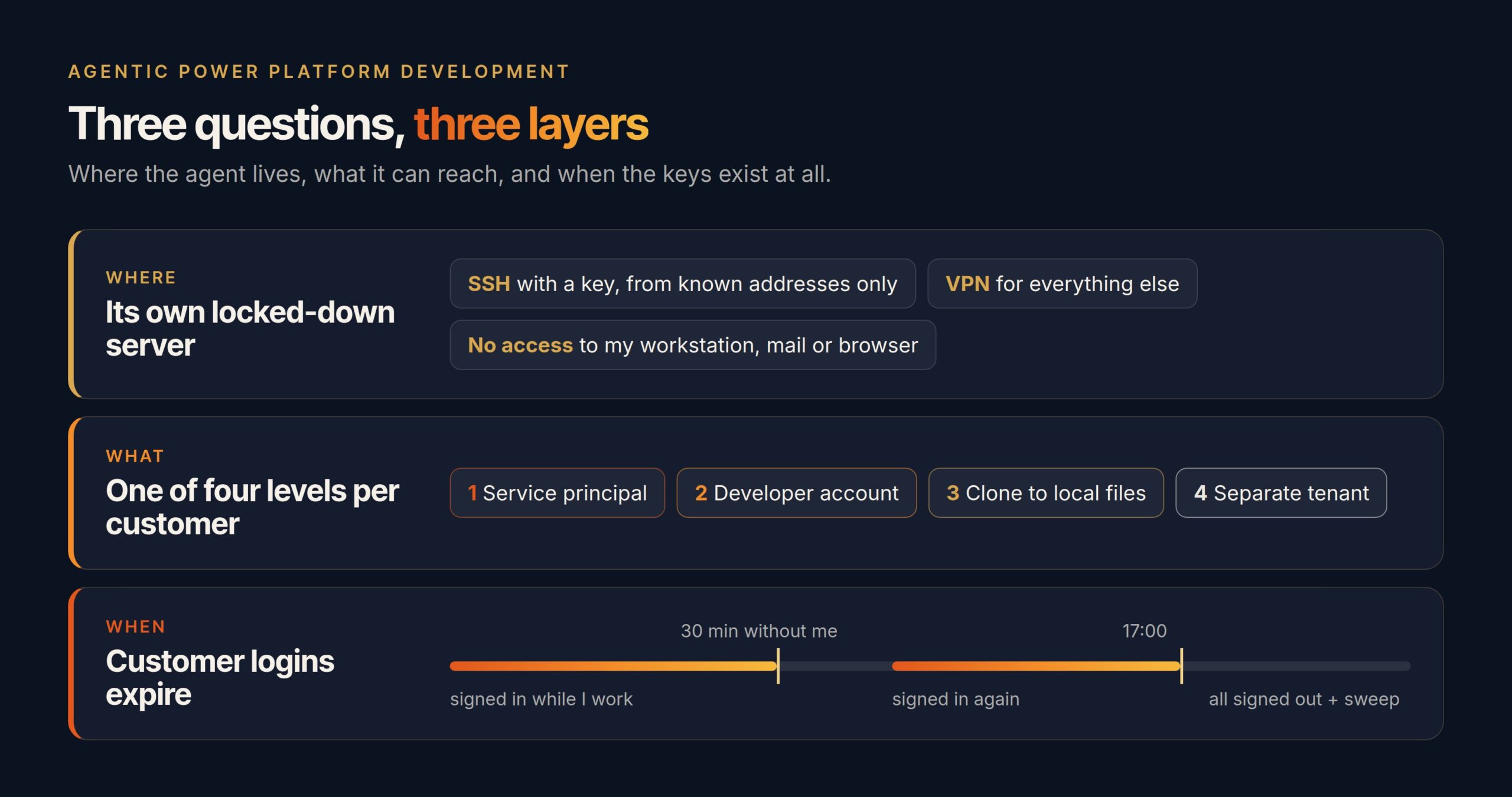
My coding agent, Claude Code, does not run on my laptop. It runs on its own server in Azure, in an environment I have locked down myself. SSH is open only from known network addresses, with a key and no password. Everything else goes through a VPN. There are no other holes in it.
The point is not only that the server is hard to break into. The point is that the agent has no access to my workstation. It cannot read my mail, use my browser sessions, or open the files of another customer project. I control what it can reach, one credential at a time, and each credential is something I gave it on purpose. I wrote earlier about how I set up that Linux server for Copilot Studio development.
And if someone did get in, they would find a machine with no standing access to customer environments. That is the job of the logout rules further down.
Level 1: a service principal is the widest door, and it is still a narrow one
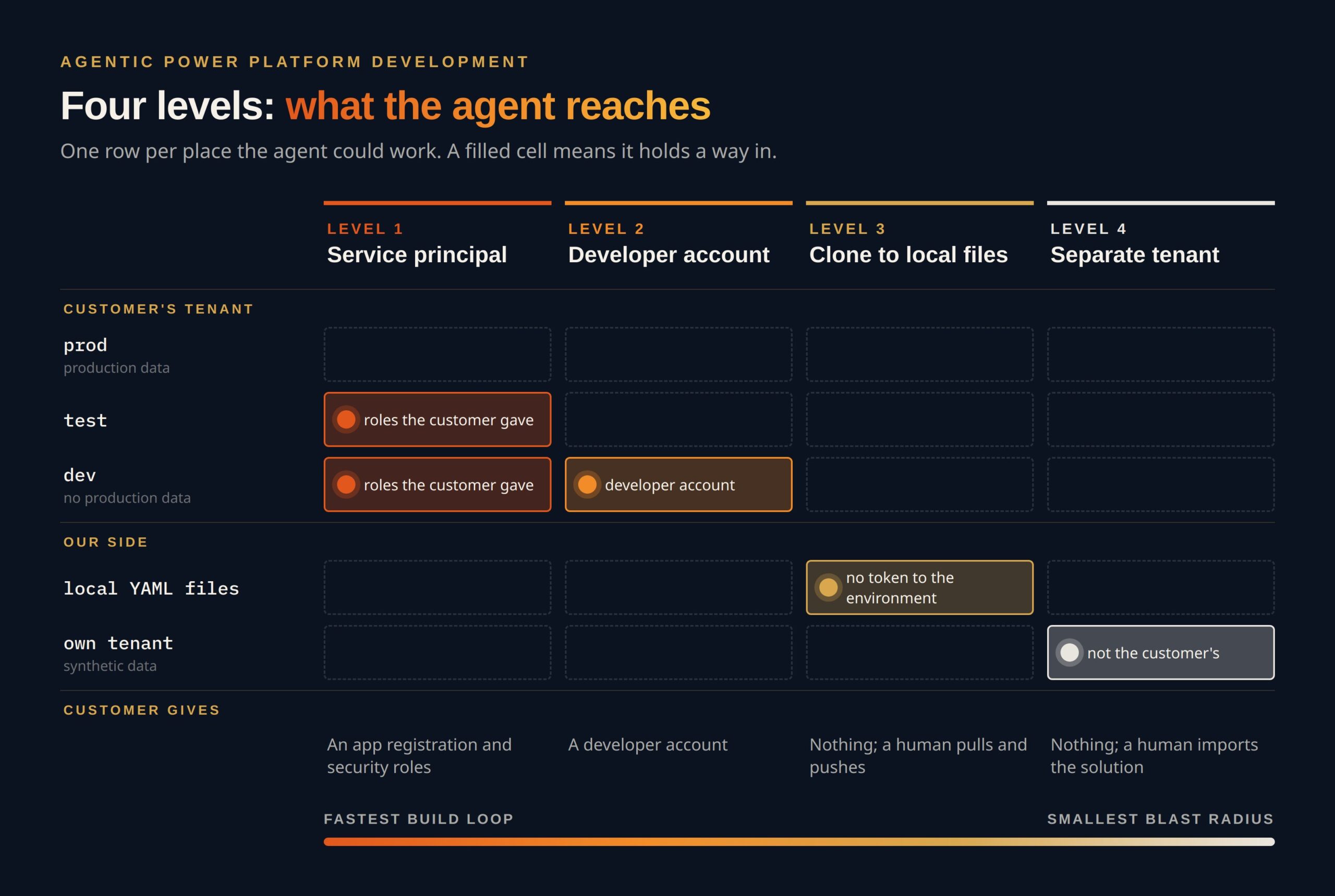
With one customer I work at service principal level. The agent uses the Power Platform CLI to import solution packages, build Power Automate flows, edit Canvas Apps in co-authoring mode and work on Copilot Studio agents. This is the fastest level, because the agent can build, deploy and check its own result in a loop.
It is still bounded. The service principal has the security roles the customer gave it in the environments the customer chose, and nothing in production happens without me. Every step runs under my supervision.
Level 2: a developer account turns the dev environment into a fenced playground
Some customers prefer that the agent works with my own developer account, and that account reaches only the development environment. There is no production data there. The agent can break things, but only where breaking things is allowed and cheap to fix.
The account does not need to reach test or production either. A Power Platform pipeline carries the solution from dev to test and from there to production. When the pipeline is set up for delegated deployment, the deployment runs as the pipeline’s own identity instead of the developer’s, and every deployment waits for approval. The same managed artifact goes through every stage, so nothing reaches production without passing test first.
This is the level I would suggest to most teams as a starting point. It keeps the build loop, and the worst case is a reset of a dev environment.
Level 3: a clone keeps the agent out of the environment entirely
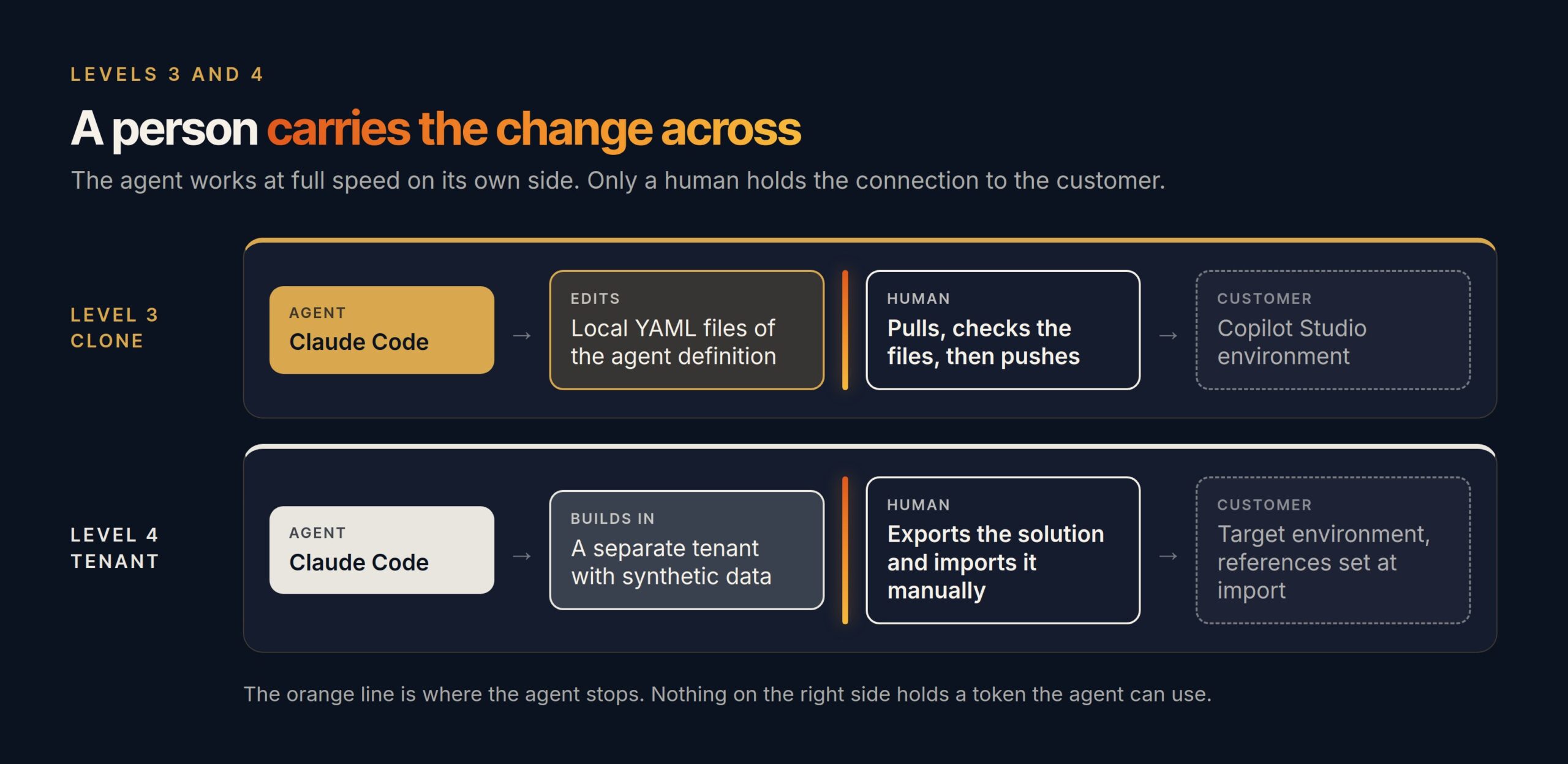
Some organizations do not want an agent inside their data at all. For Copilot Studio there is a clean answer. The agent definition is cloned to local disk as YAML files, the agent edits the files, and the changes are pushed back to the environment. Microsoft documents this as a supported workflow and names Claude Code and GitHub Copilot as tools for it.
The agent never holds a token to the environment. It works on text. The connection belongs to the human who pulls and pushes. One trap from practice: a pull can report success even after a conflict, so check the files before you push anything back.
Level 4: a separate tenant means no connection at all
The level that is often missing from this conversation is the one where there is no connection to the customer at all, not even a clone. Then I build agentically in a separate technical or developer tenant. The agent has full speed there, because nothing in that tenant belongs to the customer. When the work is ready, I export it as a solution and a person imports it into the customer’s environment manually.
The customer’s data never enters the agent’s reach. Test data is synthetic. The cost is honest too: connection references and environment variables are set at import, and anything that depends on the customer’s own systems can only be tested after the import. Note also that developer environments are changing. From 15 November 2026 the Power Apps Developer Plan no longer creates a developer environment at sign-up, and each user can create only one managed developer environment. A separate test tenant, for example through the Microsoft 365 Developer Program, is the cleaner base for this level.
| Level | What the agent reaches | What the customer gives |
|---|---|---|
| 1 | Chosen environments through a service principal | An app registration and security roles |
| 2 | One dev environment with no production data | A developer account, and a pipeline that deploys to test and production |
| 3 | Local files only | Nothing; a human pulls and pushes |
| 4 | A tenant that is not the customer’s | Nothing; a human imports the solution |
Logins expire when I am not there
The levels decide what the agent can reach. The logout rules decide when. If I do not respond for 30 minutes, the customer logins on the server are signed out. At five o’clock all of them are signed out, whatever is going on. A separate sweep catches sessions that got stuck past that rule.
The mechanism is simple: a customer connection exists only while I am actively working with it. A server that is broken into at night holds no keys to anyone’s tenant.
The agent speeds me up, it does not do the work for me
None of this is “Claude does it and I go for coffee”. I follow the work the whole time, I review what it changes, and I test everything myself before anything moves forward. The agent makes me faster. It does not take my responsibility.
The question is not whether the agent is safe. The question is which door you open for it, and who holds the key when you are not looking.
That is also why I ask the question at the start of every project, and not after the first delivery. Which level would your security team pick today, and could they tell you why?
How we decide what our own AI agents may touch
The same thinking runs our own AI agents outside customer work. We do not trust an instruction that says “never send email” or “never delete”. An instruction can be misread or forgotten in a long task. A permission that is not there cannot be used. So our agents get only the keys their job needs: reading without sending, moving to the trash instead of deleting, and a person who approves the rest. We walk through how we decide this, and the key mistake we made ourselves, in What should your AI be allowed to touch? Accounts, keys and permissions. More episodes on Armandiel AI on YouTube.